Pros
- Clear split between Steam-first and Windows-first buyers
- Honest about May 2026 Steam Deck price changes
- Covers Ally X and the newer Xbox Ally lineup without confusion
- Battery and TDP trade-offs explained with real-world framing
Cons
- Street prices and clearance stock shift weekly — verify before checkout
- Benchmarks vary by game, driver version, and power cap
- Does not replace our full single-device deep dives
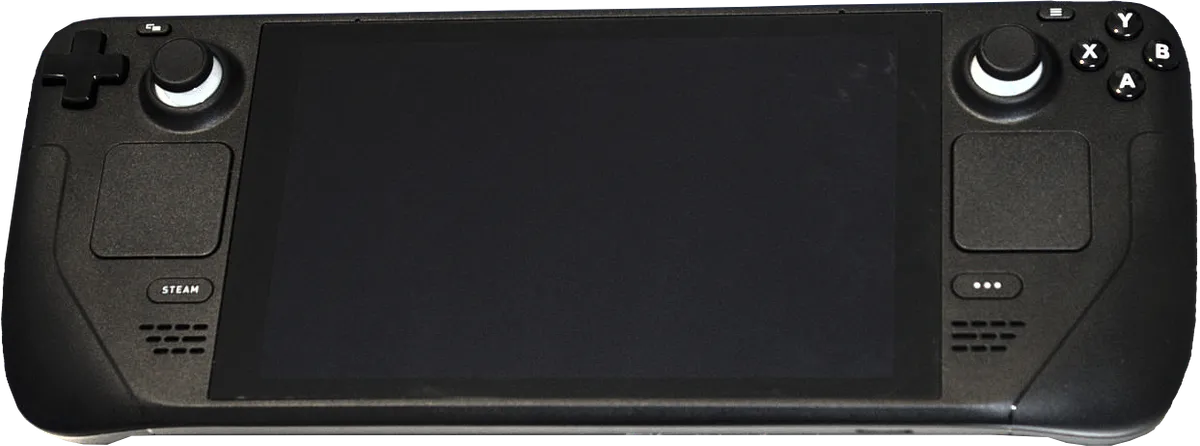
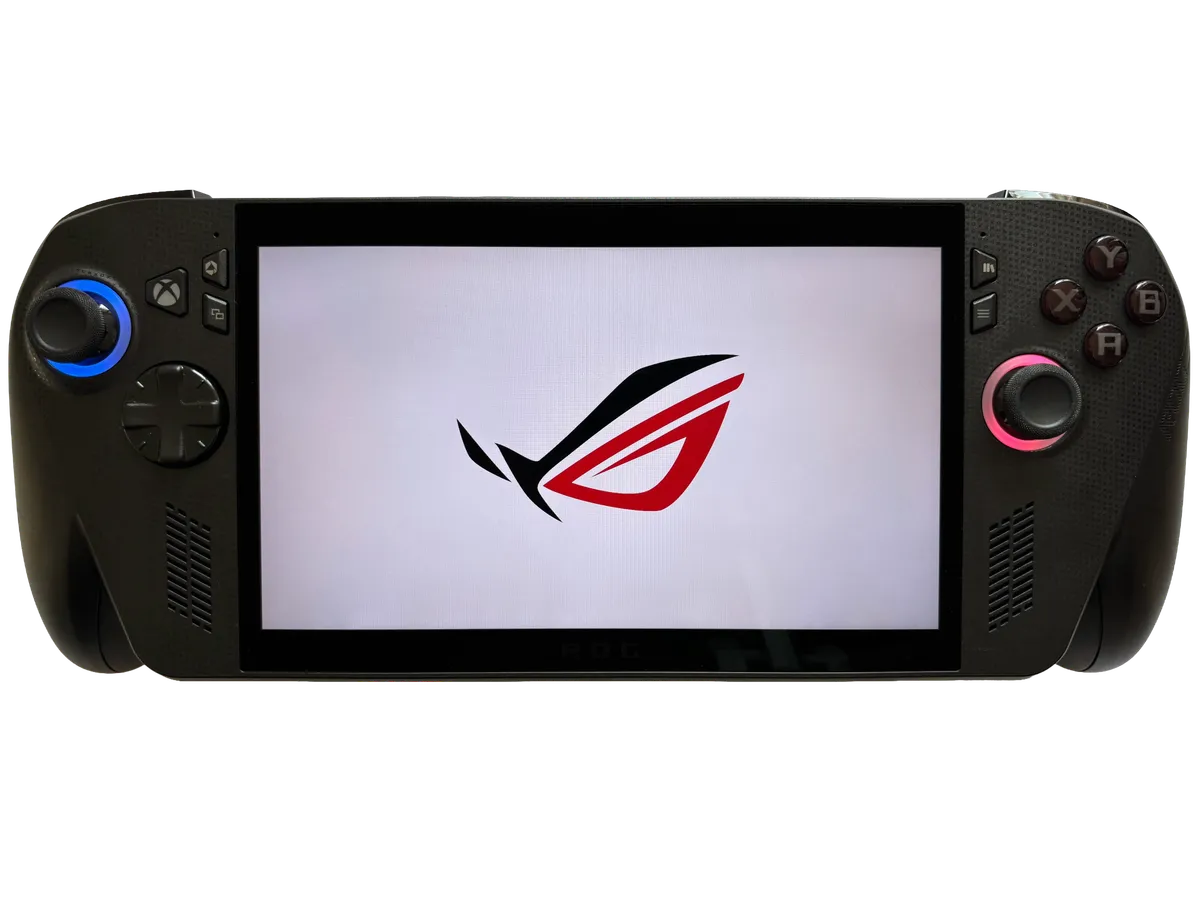
Choosing between Steam Deck vs ROG Ally in 2026 is no longer a simple “$250 cheaper Deck” decision. Valve’s May 2026 price increase pushed the Steam Deck OLED to $789 for 512GB, nearly matching the ASUS ROG Ally X at $799.99 — while the original ROG Ally lingers on clearance and a new Xbox-branded Ally generation complicates the Windows side. This steam deck vs rog ally 2026 guide cuts through spec-sheet marketing: who each handheld is for, where the money actually goes, and which compromises matter on a couch, on a flight, or at a desk dock.
If you already read our Steam Deck OLED review or ROG Ally X review, treat this page as the head-to-head tie-breaker. We own both angles on NexReview; here we compare them directly for buyers standing at checkout in September 2026.
Handheld PC gaming — Wikimedia Commons
Steam Deck vs ROG Ally Quick Picks (2026)
| If you want… | Buy | Why |
|---|---|---|
| Best handheld UX for Steam libraries | Steam Deck OLED | SteamOS, Proton polish, OLED HDR, quieter fans |
| Maximum Windows compatibility | ROG Ally X | Native Win11, Game Pass, Epic, anti-cheat edge cases |
| Best screen for dark AAA scenes | Steam Deck OLED | True OLED contrast and ~1000-nit HDR peak |
| Sharpest motion in fast shooters | ROG Ally X | 1080p 120Hz IPS with VRR |
| Longest runtime on indie / 2D titles | Steam Deck OLED | Efficient 15W ceiling; SteamOS sleep behaves |
| Lowest entry price (risky) | Original ROG Ally (clearance) | Open-box ~$450–500 if you accept 40Wh battery |
| Newest ASUS flagship | ROG Xbox Ally X | Z2 Extreme, Xbox full-screen mode — but $999.99 |
| Skip both if… | You hate tinkering | Switch 2 or a phone + controller may fit better |
NexReview editorial score for this comparison: 9.1/10 as a buying framework — not a single-device score.
What “ROG Ally” Means in 2026 (Do Not Buy the Wrong Box)
Searchers typing steam deck vs rog ally 2026 often mean “Valve’s handheld vs ASUS’s Windows handheld.” Fair — but ASUS now sells four related products, and retailers still list old SKUs:
| Device | Launch | Typical 2026 status | Chip | RAM / storage |
|---|---|---|---|---|
| ROG Ally (2023) | June 2023 | Clearance / open-box only | Ryzen Z1 Extreme | 16GB / 512GB |
| ROG Ally X (2024) | July 2024 | Still sold; production winding down | Ryzen Z1 Extreme | 24GB / 1TB |
| ROG Xbox Ally (2025) | Oct 2025 | Current entry | Ryzen Z2 A | 16GB / 512GB |
| ROG Xbox Ally X (2025) | Oct 2025 | Current flagship | Ryzen AI Z2 Extreme | 24GB / 1TB |
This comparison focuses on Steam Deck OLED vs ROG Ally X — the fair fight most buyers intend when they compare “Deck vs Ally” at similar prices. We call out the original Ally and Xbox Ally models where they change the math, but we are not comparing the Deck to a lookalike brand or a random Android clone.
Valve, meanwhile, sells Steam Deck OLED only on Steam as of 2026. LCD Decks were discontinued in late 2025; refurbished OLED units sometimes appear at $629 (512GB) or $759 (1TB) per Valve’s store — worth watching if stock returns.
2026 Pricing — The May Flip That Changed Everything
For two years, price was the Deck’s killer argument: $549 OLED 512GB vs $799 Ally X. That gap collapsed on May 27, 2026, when Valve raised OLED pricing citing memory and storage costs industry-wide:
| Model | Old MSRP | May 2026 MSRP | Change |
|---|---|---|---|
| Steam Deck OLED 512GB | $549 | $789 | +43% |
| Steam Deck OLED 1TB | $649 | $949 | +46% |
| ROG Ally X 24GB / 1TB | $799.99 | $799.99 | unchanged |
At 512GB-equivalent tiers, the Deck and Ally X now sit $10 apart — functionally the same sticker price. The 1TB Deck at $949 is actually $150 more than a 1TB Ally X, reversing the old “pay extra for Windows power” story.
What that means practically:
- Do not assume Deck = budget anymore. Re-run your spreadsheet with live cart prices.
- Refurb Deck OLED can undercut both if Valve has units — check before paying full MSRP.
- Clearance original Ally near $450 is a different conversation (weaker battery, 16GB) — not apples-to-apples with OLED Deck.
- ROG Xbox Ally at $599.99 undercuts both for Windows buyers who accept a slower Z2 A chip.
Reporting after the hike noted softer Steam Deck chart rankings on Steam’s bestseller lists — demand sensitivity at ~$800, not a comment on hardware quality. Shortages had already made Decks hard to buy in early 2026; the price reset coincided with stock returning in many regions.
Full Specs — Steam Deck OLED vs ROG Ally X
| Spec | Steam Deck OLED | ROG Ally X |
|---|---|---|
| Manufacturer | Valve | ASUS ROG |
| SoC | Custom AMD “Sephiroth” (6nm) | AMD Ryzen Z1 Extreme (4nm) |
| CPU | Zen 2, 4C / 8T, up to 3.5 GHz | Zen 4, 8C / 16T, up to 5.1 GHz |
| GPU | RDNA 2, 8 CU (~1.6 TFLOPS class) | RDNA 3, 12 CU (much higher throughput) |
| RAM | 16GB LPDDR5-6400 | 24GB LPDDR5X-7500 |
| Storage | 512GB or 1TB NVMe (M.2 2230) | 1TB NVMe (M.2 2280, user-upgradeable) |
| Display | 7.4" OLED, 1280×800, 90Hz, HDR10 | 7" IPS, 1920×1080, 120Hz, VRR |
| Peak brightness | ~1000 nits (HDR) | ~500 nits |
| Battery | 50Wh | 80Wh |
| Weight | ~640g | ~678g |
| TDP range | ~4–15W (15W practical ceiling) | ~9–30W (Armoury Crate profiles) |
| OS | SteamOS 3 (Arch Linux + Proton) | Windows 11 Home |
| USB | 1× USB-C 3.2 Gen 2 | 1× USB4 + 1× USB-C 3.2 Gen 2 |
| microSD | UHS-I | UHS-II |
| Wireless | Wi-Fi 6E, Bluetooth 5.3 | Wi-Fi 6E, Bluetooth 5.4 |
| Fan noise (load) | ~22–25 dBA (often cited) | ~32–43 dBA (higher TDP) |
On paper, Ally X wins CPU, GPU, RAM, resolution, refresh, battery capacity, and ports. Deck OLED wins panel technology, HDR, efficiency, acoustic comfort, and software integration for Steam. Real life is messier — next sections.

Portable play — Wikimedia Commons
Performance — When Ally X Pulls Away (and When It Does Not)
The Z1 Extreme is a generational step above Valve’s custom APU. In demanding AAA titles — Cyberpunk 2077, Starfield, recent Ubisoft open worlds — Ally X typically holds higher frame rates at 1080p with FSR or XeSS, especially when you allow 20–25W TDP on wall power.
The Deck is not useless in AAA. SteamOS per-game profiles, FSR, and a native 800p render target keep many Verified titles playable at 30–60 fps within the 15W envelope. Indies, roguelikes, CRPGs, and older back-catalog games are the Deck’s comfort zone — exactly what many buyers actually play on handhelds.
Critical nuance: at matched ~15W, gaps shrink dramatically. Independent testing in 2026 repeatedly shows the Deck’s efficiency-focused silicon staying competitive in lighter workloads while Ally X needs higher wattage to justify its chip. If you plan to cap Ally X at 15W for battery reasons, you are not automatically getting “double the performance.”
Anti-cheat and launcher edge cases still favor Windows: some live-service titles, certain Epic exclusives, or niche Korean MMOs may refuse Proton on Deck while running on Ally X. Reverse also exists — a handful of titles run better on Linux natively — but Windows remains the compatibility superset.
For emulation, both are capable; Ally X’s extra RAM helps heavy PlayStation 3 or Switch-class experiments, while Deck’s community guides and SteamOS desktop mode are mature. Either can become an emulation slab; neither replaces a dedicated console for legal disc libraries.
Display — OLED Beauty vs 1080p Speed
This is the most feel-different part of steam deck vs rog ally 2026.
Steam Deck OLED delivers true blacks, wide contrast, and HDR highlights that make Hades, Elden Ring night scenes, and filmic indies pop on a lap. Text at 1280×800 can look soft in desktop mode or small UI — acceptable for game-first use, frustrating for heavy browser work.
ROG Ally X pushes 1920×1080 at 120Hz with FreeSync. UI text is sharper; fast camera pans in shooters benefit from high refresh. IPS means elevated black levels and no HDR — outdoor readability is fine at ~500 nits, but moody lighting loses the Deck’s wow factor.
Preference split:
- Cinematic single-player, retro, pixel art: Deck OLED.
- Competitive shooters, Game Pass UI at native res: Ally X.
- Mixed: honestly, side-by-side in a store if possible — panel type beats spec numbers here.
Battery Life — Capacity Is Not Runtime
Ally X packs 80Wh vs 50Wh — a 60% larger cell. Yet many reviewers report similar or shorter AAA runtime on Ally X because Windows background tasks and higher default TDP draw burn faster. Expect roughly:
| Use case | Steam Deck OLED (typical) | ROG Ally X (typical) |
|---|---|---|
| Indie / 2D / visual novel | 5–9 hours | 4–7 hours (if TDP capped) |
| Medium AAA, tuned | 2.5–4 hours | 2–3.5 hours |
| Max performance wall power | N/A (plugged) | 1.5–2.5 hours portable max TDP |
Deck wins efficiency per watt — SteamOS suspend/resume is handheld-native. Windows on Ally X improves yearly but still invites driver updates, background indexing, and Game Bar hooks that nibble idle power. Power users who dial Armoury Crate to 15W and disable bloat can close the gap; casual users often do not.
For travel, Deck’s USB-C PD charging from a 65W pack is well documented; Ally X benefits from the same but may pull harder during play. Both charge slower while gaming — plan layovers accordingly.
Software — SteamOS Polish vs Windows Freedom
Steam Deck OLED boots into a controller-first UI. Proton compatibility layers, Steam Cloud, per-game performance limits, and Big Picture-style navigation feel finished in 2026. Desktop mode adds Firefox, Discover store, emulators, and experimental dual-boot Windows for tinkerers — not required for most owners.
Trade-offs:
- Non-Steam launchers need work (Heroic, Lutris, or dual-boot).
- Xbox Game Pass native app is awkward or unsupported in SteamOS — cloud streaming works, native installs do not.
- Some anti-cheat titles remain Deck-incompatible despite Verified badges — always check ProtonDB before buying new live-service games.
ROG Ally X is a full PC. Install Steam, Game Pass, Epic, GOG, battle.net, office suites, Discord overlays, mod managers — whatever Windows allows. Armoury Crate maps TDP, fan curves, and controller modes; it is better than launch-year chaos but still PC maintenance on a small screen.
Who wins software?
- Steam-heavy, want console-simple: Deck, decisively.
- Game Pass day-one, multi-store, work + play: Ally X.
- Linux enthusiast: Deck desktop mode; Ally X if you need Windows-only tools daily.
Community note: enthusiasts have flashed SteamOS onto Ally hardware with mixed results — interesting for forums, not our default buyer advice.
Action titles on handheld — Wikimedia Commons
Ergonomics, Noise, and Repair
Both are chunky adult hands devices — not Switch Lite pocketable. Deck’s grips and trackpads help strategy games and cursor-heavy indies without a keyboard. Ally X refined weight distribution vs the 2023 Ally; rear vents can blow warm air on thumbs in high TDP modes.
Fan noise: Deck stays whisper-quiet at 15W; Ally X under 25–30W can hit low-40s dBA in quiet rooms — audible during calls or bedtime gaming.
Repair and storage: Ally X’s full-size M.2 2280 slot is a genuine ownership win — cheap 2TB upgrades. Deck uses 2230 drives; upgrades exist but cost more per gigabyte. iFixit-style guides favor Ally X for storage DIY; Deck battery swaps are documented but involved.
Who Should Buy the Steam Deck OLED?
Buy the Deck if most of these are true:
- Your library is mostly Steam and ProtonDB-green for favorites.
- You want the best handheld screen under $1000.
- You value quiet fans and longer indie battery over max AAA fps.
- You prefer not managing Windows updates on a 7-inch panel.
- You might use trackpads for mouse-heavy games.
Skip the Deck if Game Pass native installs drive your calendar, you need specific Windows-only anti-cheat titles, or you refuse to learn a little Linux quirks — Ally X will feel simpler for those jobs even if messier overall.
Deep dive: Steam Deck OLED review.
Who Should Buy the ROG Ally X?
Buy Ally X if most of these are true:
- You want 1080p / 120Hz and will crank TDP for AAA.
- Xbox Game Pass, Epic exclusives, or work apps matter alongside Steam.
- 24GB RAM future-proofs mod-heavy or emulator use.
- You are comfortable with Armoury Crate, driver updates, and TDP tuning.
- User-upgradeable storage matters for a growing library.
Skip Ally X if you mainly play verified Steam indies, hate fan noise, or want plug-and-play — Deck delivers more joy per watt for that persona.
Deep dive: ROG Ally X review.
What About the Original ROG Ally and Xbox Ally Models?
Original ROG Ally (2023): Same Z1 Extreme as Ally X but with 16GB RAM, 512GB storage, 40Wh battery, and older ergonomics. At $450–500 open-box in 2026 it tempts — but the battery alone is a deal-breaker for many after Ally X doubled runtime. Only for bargain hunters who stay plugged in.
ROG Xbox Ally ($599.99): Newer, Xbox-forward software, 60Wh battery, weaker Z2 A chip than original Ally’s Z1 Extreme in several comparisons — better UX, not better raw horsepower. Competes with Deck on price, not with Ally X on specs.
ROG Xbox Ally X ($999.99): Successor flagship with Ryzen AI Z2 Extreme, 24GB, 1TB — faster than Ally X, Xbox full-screen experience, $210 above a $789 Deck. Choose it if you want the newest ASUS/Microsoft integration and will pay premium; choose Ally X if you find one at $799 while stock lasts.
None of these invalidate the core Steam Deck vs ROG Ally question — they widen the menu.
Alternatives Worth a Glance (Not Full Reviews Here)
| Device | Why mention it |
|---|---|
| Lenovo Legion Go | Larger 8.4" screen, detachable controllers — heavier trade |
| MSI Claw 8 AI+ | Intel route; verify game compatibility before buying |
| Nintendo Switch 2 | Console ecosystem, not PC library — different buyer |
| Ayaneo / GPD Win | Enthusiast pricing, smaller community support |
If steam deck vs rog ally 2026 already feels overwhelming, these do not simplify it — stick to Deck vs Ally X unless you have a specific screen-size need.
Migration Tips — Switching Between Platforms
Deck → Ally X: Export saves where cross-platform cloud exists; rebuy or reauth on Windows stores. Expect to reinstall and redo graphics settings — no one-click migration.
Ally X → Deck: Check ProtonDB per title; move non-Steam DRM games to Steam’s “Add Non-Steam Game” only after verifying Linux support. Game Pass installs do not transfer.
Both: microSD for ROM-style libraries or slow storage overflow; use same 65W+ USB-C PD charger standards; screen protectors recommended — OLED burn-in is rare but scratches are not.
NexReview Verdict — Steam Deck vs ROG Ally 2026
There is no universal winner — September 2026 finally made that honest. Before May, we defaulted many readers to Steam Deck OLED on value. At $789 vs $799.99, the decision is purely priorities:
| Priority | Winner |
|---|---|
| Steam library + UX + OLED + efficiency | Steam Deck OLED |
| Windows stores + peak fps + 1080p + RAM | ROG Ally X |
| Lowest cash (clearance, with caveats) | Original ROG Ally or refurb Deck |
| Newest Xbox-integrated ASUS | ROG Xbox Ally X ($999.99) |
We score the comparison guide 9.1/10 — not either device. Personally, for a Steam-backlog couch machine, Deck still wins on experience per dollar even at $789. For Game Pass-heavy, travel Windows, or 1080p competitive play, Ally X earns its place — especially at 1TB where it undercuts the $949 Deck.
Verify your cart the day you buy. Memory shortages, refurb drops, and clearance Ally units change the math weekly. Either legitimate choice beats analysis paralysis: both are real products from Valve and ASUS, not white-label clones.
FAQ — Steam Deck vs ROG Ally 2026
Is the Steam Deck still worth it after the 2026 price increase?
Yes if you value SteamOS, the OLED panel, and efficiency — and if you compare against $799 Ally X, not the old $549 anchor. At $789 it is fair, not steal pricing. Hunt refurb stock or wait for promotions if you are price-sensitive.
Is ROG Ally X better than Steam Deck OLED for performance?
Raw horsepower: yes, especially above 15W and at 1080p. Per-watt enjoyment on Steam-only libraries: often no — Deck stays smoother and quieter in its lane.
Which has better battery life?
Deck for most real-world mixed play, despite Ally X’s bigger cell. Ally X can win if you aggressively cap TDP and tame Windows background apps — but out of the box, Deck lasts longer on indies and ties or wins many AAA tests.
Can I play Xbox Game Pass on Steam Deck?
Cloud streaming works; native Game Pass PC installs are not supported on SteamOS the way they are on Ally X. If Game Pass downloads are core, lean Windows.
Do both run emulators?
Yes. Ally X’s extra RAM helps heavier targets; Deck’s community guides are more centralized. Legal ROMs only — own what you rip.
Steam Deck OLED vs ROG Ally X — which display is better?
Deck for HDR, contrast, and cinematic games. Ally X for sharpness, 120Hz, and UI text. Neither is wrong — they optimize different visuals.
Should I buy the original ROG Ally in 2026?
Only at steep clearance and if you accept 40Wh battery and 16GB RAM. For most buyers, Ally X or Xbox Ally models are safer long-term.
What about the ROG Xbox Ally X instead of Ally X?
It is the newer flagship ($999.99) with Z2 Extreme and Xbox software integration. Choose it over Ally X if you want the latest ASUS/Microsoft path and will pay premium; choose Ally X if you find remaining stock at $799.
Which is easier for non-technical users?
Steam Deck for Steam-only gamers. Ally X if they already live in Windows and refuse Linux — but Windows handheld maintenance is still PC literacy, not Switch simplicity.
Will NexReview update this steam deck vs rog ally 2026 page?
Yes when pricing, stock, or major firmware shifts materially. Always confirm live MSRP on Steam and ASUS before purchase.