Pros
- First credible user-swappable laptop GPU module in the consumer market
- Mainboard swaps between Ryzen 7040 and Ryzen AI 300 without new chassis
- Six Expansion Card bays plus GPU-module USB-C for port flexibility
- 85Wh battery and large cooling headroom versus Laptop 13
- OCuLink Dev Kit enables direct PCIe to external GPUs or eGPU docks
Cons
- Fully loaded configs rival premium gaming laptops without gaming-laptop deals
- 5.3 lb with GPU module — not a true thin-and-light
- Matte 16-inch panel is excellent but not OLED or mini-LED HDR
- DIY assembly and modular top-case still intimidate mainstream buyers
- GPU module TGP caps around 100W — below many thick 16-inch rivals
Framework Laptop 16 is Framework Computer’s large-format answer to a question the PC industry buried for a decade: what if you could upgrade the graphics card in a laptop the same way you swap an M.2 SSD? This Framework Laptop 16 review (November 2026) walks through the real machine sold at frame.work — not lookalike “modular” rebadges, not Microsoft’s unrelated software frameworks, and not generic 16-inch gaming slabs with one user-accessible SSD. We cover Expansion Bay graphics (NVIDIA GeForce RTX 5070 and AMD Radeon RX 7700S modules), Ryzen AI 300 mainboard upgrades, thermals, battery life, the 2026 one-piece keyboard refresh, OCuLink, and whether the platform justifies its premium over a sealed MacBook Pro M5 or a conventional RTX 5070 gaming notebook.
If you landed here from framework laptop 16 review search intent, you probably already know Framework from the Framework Laptop 13 ultrabook line. The Laptop 16 scales that repairability philosophy to a 16-inch chassis with dual fans, an 85 watt-hour battery, and a rear Expansion Bay that accepts snap-in GPU modules. It is the only consumer laptop in 2026 where “I will buy a better GPU in three years” is a literal shopping path, not a fantasy forum thread.
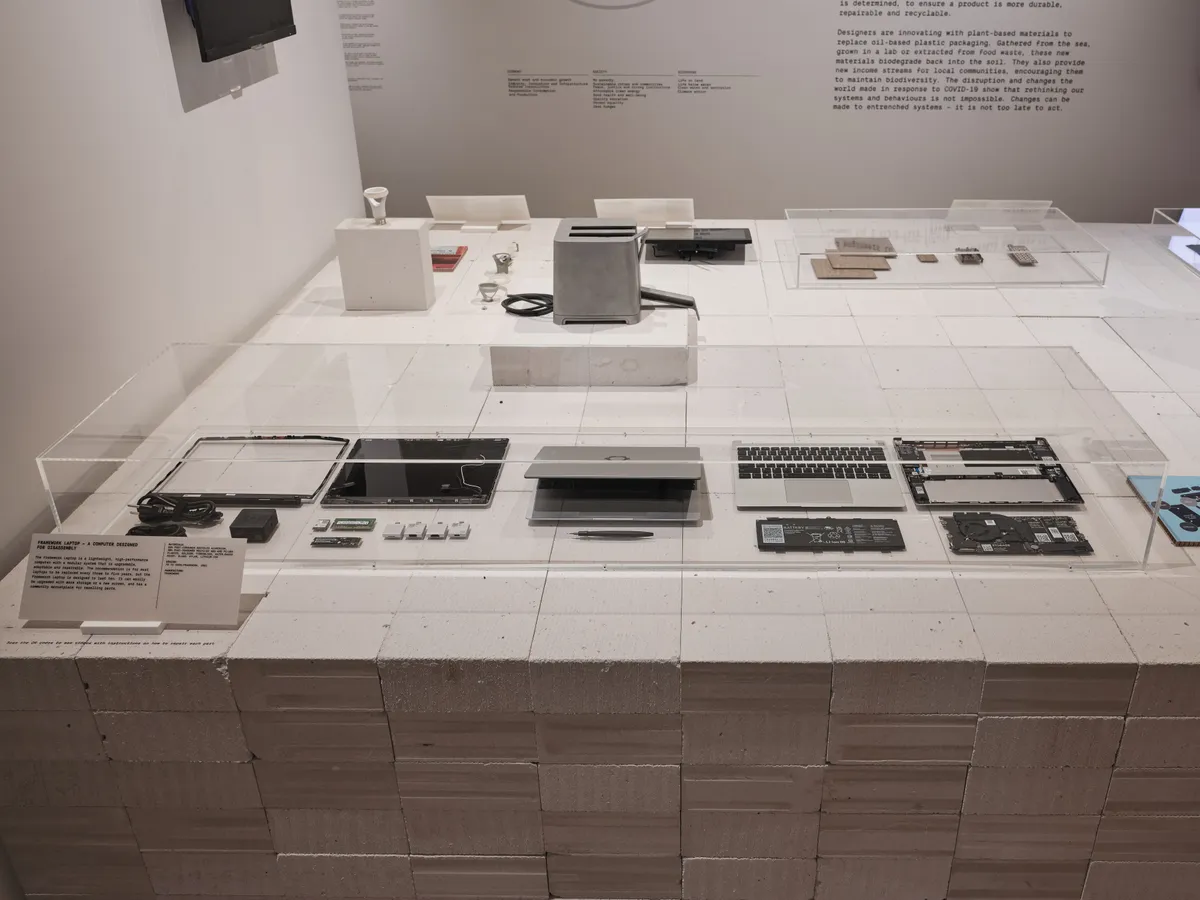
Framework Laptop on display — Wikimedia Commons (CC)
Framework Laptop 16 Review: Quick Verdict (For Skimmers)
| Field | Detail |
|---|---|
| Manufacturer | Framework Computer Inc. (frame.work) |
| Form factor | 16-inch repairable notebook with optional discrete GPU module |
| Release platform | 2024 chassis; major GPU/CPU refresh 2025–2026 |
| Processors (current) | AMD Ryzen AI 5 340, Ryzen AI 7 350, Ryzen AI 9 HX 370 |
| Graphics options | Integrated Radeon 860M/890M; RTX 5070 Laptop (8GB or 12GB); RX 7700S (2nd gen); or no module |
| Display | 16" 2560×1600, 165 Hz, matte, 100% DCI-P3, ~500 nits |
| Battery | 85 Wh user-replaceable |
| Weight | ~4.63 lb (2.1 kg) without GPU module; ~5.29 lb (2.4 kg) with module |
| DIY starting price | From ~$1,249 (2026 entry Ryzen AI 5 config — verify live configurator) |
| Pre-built starting price | From ~$1,599 (pricing shifts with RAM/SSD sales) |
| NexReview score | 8.6/10 |
Buy it if you want a primary workstation that can gain discrete graphics later, you plan to keep the chassis 6–8 years, and you are willing to learn a screwdriver-first ownership model. Skip it if you need the cheapest RTX 5070 fps-per-dollar, ultra-light travel weight, or a single purchase with zero assembly — a Legion-class gaming laptop or sealed MacBook will feel simpler at checkout.
What Is the Framework Laptop 16?
Framework Laptop 16 debuted as Framework’s first large chassis — wider deck, more cooling, six Expansion Card slots (versus four on the 13), and an Expansion Bay behind the keyboard that holds either a spacer, an active GPU module, or future Framework-designed bay accessories. The laptop splits along familiar Framework lines: bottom cover, input cover, display assembly, mainboard, RAM, storage, Wi-Fi card, and battery are all documented replacement parts.
The product is explicitly modular computing hardware from Framework Computer Inc., headquartered in the repairable-laptop space alongside Fairphone-style philosophy but with PC performance targets. Competing brands sometimes advertise “upgradeable RAM” on one SKU; Framework sells the GPU as a field-replaceable module with a three-screw install after you remove the input deck — a workflow reviewers at Ars Technica and WIRED documented as genuinely quick, not a service-center-only procedure.
How It Differs From Framework Laptop 13
| Trait | Laptop 13 | Laptop 16 |
|---|---|---|
| Screen | 13.5" 3:2 | 16" 16:10 |
| Expansion ports | 4 bays | 6 bays |
| Discrete graphics | No (iGPU only) | Expansion Bay GPU modules |
| RAM (AMD AI 300) | SO-DIMM DDR5 | SO-DIMM DDR5 up to 96 GB |
| Typical buyer | Ultrabook + Linux dev | Creator, engineer, part-time gamer |
| Weight | ~1.4 kg class | 2.1–2.4 kg depending on GPU |
Owners often pair a Laptop 13 for travel and a Laptop 16 for desk duty — Expansion Cards are largely cross-compatible, so your port investment transfers. If you only want one machine and need GPU headroom, the 16 is the Framework SKU that matters.
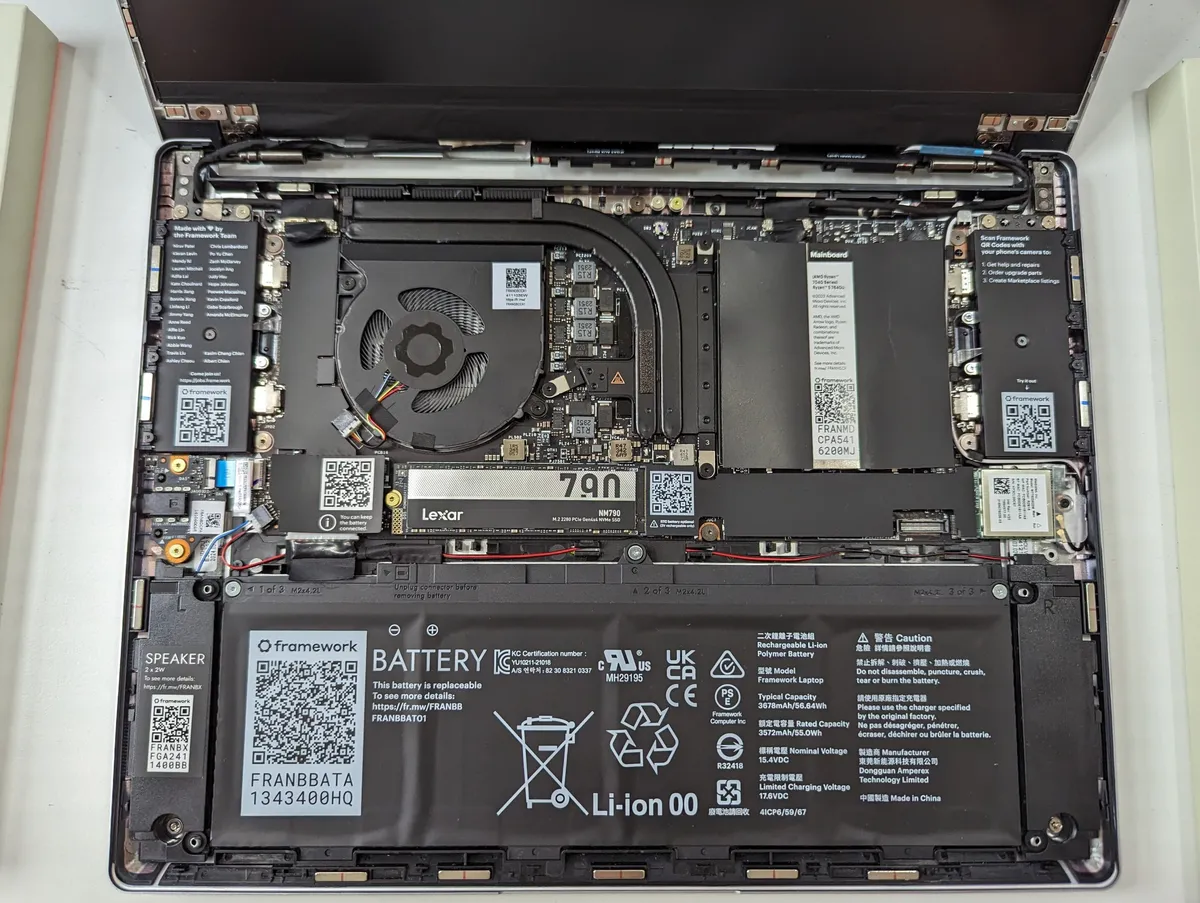
Laptop motherboard upgrade context — Wikimedia Commons (CC)
Expansion Bay Graphics: The Headline Feature
The Framework Laptop 16 review conversation always starts here because nobody else shipped a credible consumer swap-in laptop GPU module before Framework did. The Expansion Bay is not a proprietary sealed solder blob; it is a mechanical shell with its own dual-fan cooler, heat pipes, and a connector that mates with the mainboard when you slide the module in until it clicks.
Available Graphics Modules (2026)
| Module | VRAM | Approx. TGP (on AC) | Role |
|---|---|---|---|
| None (spacer) | — | — | iGPU-only, lightest weight |
| AMD Radeon RX 7700S (2nd gen) | 8 GB GDDR6 | Up to ~100 W | AMD loyalists, OpenCL workloads |
| NVIDIA GeForce RTX 5070 Laptop (8 GB) | 8 GB GDDR7 | Up to ~100 W | DLSS 4, CUDA, ray tracing |
| NVIDIA GeForce RTX 5070 Laptop (12 GB) | 12 GB GDDR7 | Up to ~100 W | Heavier VRAM textures, local LLM experiments |
Integrated options on Ryzen AI mainboards include Radeon 860M (Ryzen AI 7 350) and Radeon 890M (Ryzen AI 9 HX 370) for lightweight gaming and multiple external displays without a module.
Performance reality check: a 100 W TGP RTX 5070 module will not match every thick 16-inch brick that runs the same GPU at 140 W+. Framework trades maximum frame rates for upgrade economics and repair transparency. You are buying a platform, not guaranteed chart-topping 3DMark records. For many 1440p AAA titles at high settings, the module is absolutely usable; for competitive esports at max refresh, tune expectations downward versus dedicated gaming brands.
Installing or Swapping the Module
After removing the keyboard/input cover (standard Framework workflow — magnets and screws, no warranty-void stickers), the GPU module releases with three screws under the bay. You do not remove the metal mid-plate for a swap. Pop the new module in, reassemble, and you have moved from integrated graphics to discrete — a process WIRED described as one of the most successful implementations of the “upgradeable laptop GPU” dream, even if the module itself is not cheap.
Module pricing moves with supply; as of late 2026, expect on the order of $650–$700+ added at initial configuration or as a retrofit from an earlier RX 7700S or spacer setup. Confirm frame.work the week you order — GPU memory pricing has been volatile industry-wide.
CPUs, Memory, Storage, and Thermals
Framework’s 2025–2026 refresh brought AMD Ryzen AI 300 processors to the Laptop 16 while retaining compatibility paths for owners on earlier Ryzen 7040 mainboards — a first for Framework’s large chassis generation jump without forcing a new laptop purchase.
Processor Lineup
- Ryzen AI 5 340 (6C/12T, up to ~4.8 GHz): 2026 value entry that dropped DIY and pre-built starting prices versus earlier AI 7-only configs.
- Ryzen AI 7 350 (8C/16T, Zen 5 hybrid): Balanced default in many reviews — strong single-thread, reasonable battery on efficiency mode.
- Ryzen AI 9 HX 370 (12C/24T): Maximum CPU headroom; pairs well with RTX 5070 for compile + render pipelines.
Each chip includes an NPU (up to ~50 TOPS class) for Windows Copilot+ features and on-device inference — useful if you live in Office, not a substitute for a discrete GPU on heavy Stable Diffusion batches.
RAM and SSD
Two SO-DIMM slots accept up to 96 GB DDR5-5600 — a major advantage over the Intel LPCAMM2 pricing trap on Laptop 13 Pro configs. For developers running local Docker forests or VMs, the 16-inch is often the saner Framework buy in 2026.
Storage is twin M.2: 2280 primary (top) and 2230 secondary (underneath). Wi-Fi ships as a replaceable AMD RZ717 Wi-Fi 7 card; Framework documents the slot so you are not trapped on a dead radio five years out.
Thermals use Honeywell PTM7958 phase-change interface on CPU and GPU modules, multiple heat pipes, and dual fans in both main and Expansion Bay shells. The larger chassis lets Ryzen AI chips hold 45 W sustained / 54 W boost performance profiles on AC without the instant throttle some 14-inch ultrabooks show. Still, combined CPU+GPU stress will spin fans audibly — this is a workstation, not a fanless tablet.
Display, Input Deck, and Ports
The 16-inch panel is 2560×1600, 165 Hz, matte anti-glare, 100% DCI-P3, VRR/FreeSync, and about 500 nits peak. It is a strong creator panel — color coverage matters for photo and video more than peak HDR sparkle. G-Sync support requires the RTX 5070 module plus Framework’s Display Kit (2nd gen) if you want that specific chain validated.
2026 Input Cover Improvements
Early Laptop 16 units used modular keyboard sections and spacers that could look unfinished on a conference table. 2026 adds one-piece keyboard and one-piece trackpad options for buyers who want a centered, no-numpad layout without visible seam lines. Power users who loved swap-in numpad modules can still choose modular layouts — check the configurator for your aesthetic tolerance.
Expansion Cards and Connectivity
Six recessed USB-C bays accept Framework Expansion Cards (USB-C, USB-A, HDMI, DisplayPort, storage, audio, etc.). The GPU module adds another USB-C on the rear with DisplayPort Alt Mode. In practice you can run up to seven USB-C physical ports before dongles — rare on any laptop, repairable or not.
Two bays carry USB4 bandwidth; the remainder are USB 3.2 class. Plan card placement for your dock, external monitor, and charger side. Framework owners on the 13 already know the drill; the 16 just adds two more slots for desktop setups that hate hub clutter.

Large laptop on desk — Wikimedia Commons (CC)
Battery Life, Weight, and Mobility
The 85 Wh battery is user-replaceable — when chemistry degrades after hundreds of cycles, you buy a new pack instead of retiring the entire machine. On battery power, Framework typically caps discrete GPU TGP around 50 W to protect runtime; plan on shorter unplugged gaming sessions.
Real-world office use on integrated graphics or light loads often lands in 6–9 hours territory depending on brightness, Linux vs Windows, and how many USB-A cards sit in rear slots (idle power quirks familiar from the 13-inch line). With the RTX module installed and workloads heavy, treat battery life like any performance notebook: a few hours, then hunt for USB-C PD.
Weight without the GPU module is about 4.63 pounds — manageable in a backpack for a 16-inch. With the module, ~5.29 pounds steps toward traditional gaming-laptop heft. The payoff is you can remove the module and spacer-down for airline weeks if fps is not the mission — a flexibility sealed laptops never offer.
Charging uses USB-C Power Delivery; include enough wattage (often 100 W+ class adapters for fast charge while working). The Logitech MX Master 4 remains a natural desk mate for multi-machine Flow setups beside a Framework host.
OCuLink and External GPU Paths (2026)
Thunderbolt eGPUs have been possible for years, but tunneling overhead steals bandwidth. Framework’s OCuLink Dev Kit exposes a direct PCIe x8 OCuLink 8i link from the Expansion Bay ecosystem — lower latency and more consistent frame times than many USB4-only docks, according to Framework’s documentation and early reviewer testing.
Use cases include:
- Running a desktop graphics card on a PCIe OCuLink Dock when the laptop stays docked at home.
- Parking the Framework GPU module externally via the Graphics Module OCuLink Dock so travel weight drops while desktop fps stays high.
- Attaching fast NVMe expansion, capture cards, or 10 GbE on the PCIe dock for studio builds.
OCuLink is a power-user lane, not a beginner bundle. Budget extra cash and cable management time. It complements — not replaces — the internal module for people who split time between road and desk.
Pricing: What a Realistic Build Costs
Framework lists DIY Edition from ~$1,249 and pre-built from ~$1,599 on Ryzen AI 5 entry configs as of 2026 — always re-check before purchase. Those floors exclude a discrete GPU, ample RAM, and Windows licensing nuances.
A performance-minded config with Ryzen AI 9, 32 GB RAM, 1 TB SSD, and RTX 5070 module commonly approaches mid-$2,000s to ~$2,700+ depending on weekly part sales — Ars Technica’s late-2025 tested builds landed around $2,517 DIY without OS versus ~$2,649 pre-built. Add the RTX module at configuration time if you know you need discrete graphics; retrofitting later works but delays gratification.
Compare to:
- Sealed RTX 5070 gaming laptops during holiday sales — often cheaper upfront, zero upgrade path.
- Framework Laptop 13 — cheaper entry, no Expansion Bay GPU, better true ultrabook portability.
- MacBook Pro M5 — superior efficiency and resale, worse repairability and no modular GPU.
Framework wins total cost of ownership only if you actually execute upgrades — mainboard in 2028, GPU module in 2029, battery in 2030. If you will never open the case, you are subsidizing engineering you do not use.
Who Should Buy — and Who Should Skip
Buy Framework Laptop 16 if…
- You want field-replaceable GPU and CPU without buying a new chassis each generation.
- Your workflow mixes development, content creation, and moderate gaming on one machine.
- 96 GB SO-DIMM RAM matters and Laptop 13 Intel LPCAMM2 pricing offends you.
- You are already in the Framework ecosystem (Cards, Marketplace mainboards, spare batteries).
- Right-to-repair and transparent parts catalogs are worth paying a premium.
Skip Framework Laptop 16 if…
- Maximum fps per dollar on day one is the only metric — wait for Legion or Zephyrus sales.
- You carry your laptop daily on foot — the 13-inch or an Air class machine saves your shoulders.
- You need HDR OLED for client color approval on laptop panel alone.
- Assembly anxiety is real — DIY Edition ships as parts; pre-built helps but top-case modularity still exists.
- You refuse to monitor volatile RAM/GPU module pricing — sealed configs are psychologically simpler.
For handheld gaming when you leave the desk, our Steam Deck OLED review covers a complementary device that avoids lugging five pounds through airport terminals.
Pros and Cons (Summary Table)
| Pros | Cons |
|---|---|
| Swappable RTX 5070 / RX 7700S modules | Premium total price vs sale gaming laptops |
| Mainboard upgrade path across CPU generations | 100 W GPU TGP cap vs thicker rivals |
| 96 GB DDR5 SO-DIMM ceiling | 5.3 lb with module — heavy for “portable” |
| Six Expansion Cards + module USB-C | Matte IPS, not OLED |
| 85 Wh replaceable battery | Fan noise under combined CPU+GPU load |
| OCuLink for serious eGPU setups | DIY complexity for mainstream shoppers |
| Documented parts + Marketplace | Starting prices exclude GPU many buyers want |
FAQ — Framework Laptop 16 Review
Is the Framework Laptop 16 a gaming laptop?
It can game well with an RTX 5070 or RX 7700S module, but Framework designed it as a modular workstation platform first. Thermals and TGP limits are tuned for sustainable performance, not always maximum benchmark leaderboards.
Who makes the Framework Laptop 16?
Framework Computer Inc., sold at frame.work. This is distinct from unrelated “Framework” software companies, IT consultancies, or third-party Amazon listings that misuse the word modular.
How much does the Framework Laptop 16 cost in 2026?
Entry DIY builds start around $1,249 and pre-built around $1,599 before you add RAM, storage, GPU modules, and Expansion Cards. A discrete GPU module typically adds $650–$700+. Fully specced RTX configs often reach the $2,500–$2,800 band — verify the live configurator weekly.
Can I upgrade the GPU later?
Yes. Owners swap Expansion Bay modules with a short screwdriver session. You can start with integrated graphics and add an RTX 5070 module when budget allows, or move from AMD discrete to NVIDIA if Framework offers both for your bay generation.
Framework Laptop 16 vs Framework Laptop 13 — which should I buy?
Choose the 13 for ultraportable repairability and maximum battery efficiency. Choose the 16 if you need a larger display, SO-DIMM RAM up to 96 GB, better cooling headroom, and optional discrete graphics. Many enthusiasts own one of each.
What CPUs fit the Framework Laptop 16?
Current retail focuses on AMD Ryzen AI 300 (AI 5 340, AI 7 350, AI 9 HX 370). Earlier Ryzen 7040 mainboards remain supported for upgraders swapping boards through Framework’s store or Marketplace.
Does Framework Laptop 16 support Linux?
Yes. Framework maintains LVFS firmware delivery and strong community disto support. Pre-built Windows units are still common, but Ubuntu and Fedora users report success with Ryzen AI platforms when they match recent kernel/firmware expectations — treat NPU features as evolving on Linux.
What is the OCuLink Dev Kit?
An optional OCuLink 8i (PCIe x8) adapter ecosystem for external GPUs, external Framework GPU modules, or PCIe peripherals. It targets lower overhead than Thunderbolt tunneling for docked power users.
How heavy is the Framework Laptop 16 with the GPU module?
About 5.29 pounds (2.4 kg) with a discrete module installed versus ~4.63 pounds (2.1 kg) without — Framework’s own specifications. Removing the module for travel is a unique perk among 16-inch performance machines.
Is the Framework Laptop 16 worth it in 2026?
Worth it if you value upgrade paths and will use them — CPU mainboard swaps, GPU module purchases, battery replacements, and Expansion Card churn. Hard to justify if you want the cheapest sealed RTX 5070 laptop today and plan to replace the entire unit in three years anyway.
Verdict
The Framework Laptop 16 earns an 8.6/10 because it delivers something the industry said was impossible at consumer price points: a credible, user-serviceable GPU module on a laptop you can also refresh at the CPU, RAM, storage, and battery layers. The 2026 refinements — Ryzen AI 5 entry pricing, one-piece keyboard and trackpad modules, OCuLink for serious docks — polish the rough early-adopter look without abandoning the mission.
The laptop is not magic. You pay Module and mainboard premiums. You accept 100 W-class GPU limits. You carry real weight when the bay is full. But if you are the buyer who still angers over soldered RAM in 2026, Framework Laptop 16 is the reference design for what “commercial repairable” should mean at the performance tier — not a thin-and-light compromise, but a desktop-replacement toolbox you evolve instead of landfilling.
If your budget screams for holiday gaming-laptop discounts, buy the sale machine and enjoy it. If your ethics and spreadsheets favor one chassis, many silicon generations, configure the 16 carefully: start with the CPU tier you will not regret, add RAM on SO-DIMMs while prices fluctuate, and treat the GPU module as a timed upgrade — exactly how Framework intended the framework laptop 16 review story to end.
Score: 8.6/10 — Best Upgradeable 16-Inch — If You Commit to the Ecosystem
Related on NexReview
Compare ultraportable repairability in our Framework Laptop 13 review, Apple’s sealed alternative in the MacBook Pro M5 review, and travel gaming in the Steam Deck OLED review. For a heavy desk keyboard paired with a modular host, see the Keychron Q1 HE review.